# Linuxgraphy by Strabo
&&presentation
&¢ered &&clide
&&font35
# Linuxgraphy by Strabo
&&/font
*Made by [Syndamia](https://syndamia.com)*
&&lineb4 &&ftable
&&lineb1
2000 years ago [Strabo](https://en.wikipedia.org/wiki/Strabo) published [Geography](https://en.wikipedia.org/wiki/Geography), in which he laid out the world as it was known to the Romans and Greeks.
Today, I'll lay out Linux as it is known to me.

&&lineb1
&&/table
&&/clide &&/centered
&&slide
# Contents
&&ftable &&font20
1. Brief timeline
2. Structure of UNIX-likes
1. Layers
2. The shell
2. Everything is a file
3. What is a VT100 anyway
4. Possibilities (live CD, ...)
3. Linux systems and layout from the inside
0. Shells
1. Directories
2. Users and groups
3. Everything is a file
1. Devices
2. Processes
4. Commands you need to know
1. File management and editing
2. Regular expressions and text processing
3. Everything else
5. Networking
4. Software licensing
&&/font &&font20
5. What makes up a useful OS
0. File systems
1. Bootloader
1. Init system
2. Package (software) manager
3. Desktop manager
6. War on distros
1. What is a distribution and how do we compare them
2. Comparison
1. Slackware
2. Debian (and Ubuntu)
3. Red Hat
4. Enoch (and Gentoo)
5. Arch Linux
3. Non-desktop distros
1. AOSP
2. OpenWRT
7. Full setup and demonstration with Linux Mint
&&/font &&/table
&&/slide
&&slide
# 1. Brief timeline
&&font27
#### 1945 - 1955
Computers were these big computational devices, you directly loaded instructions into memory and let it execute your "code" (processor instructions).
Nothing else ran on the machine.
This process was labur intensive, a qualified operator had to load your program, then after completion he would have to dump the memory contents, remove any tapes, punch cards, etc., reset the machine and load the next job.
#### 1956 - 1959
By the late 1950s, as computers became faster, a lot of time was spend on operators managing jobs.
This was automated via [resident monitors](https://en.wikipedia.org/wiki/Resident_monitor): very small programs, which always *resided* in memory, and *monitored* what the state of the current job was.
If a job finished, it would automatically load and start the next program.
Since a monitor could run the next program at any time, series (batches) of jobs would be grouped together and execute one after another by the monitor.
This process is called [batch processing](https://en.wikipedia.org/wiki/Batch_processing).
&&/font &&/slide
&&font27 &&slide
#### 1960s
But by far the biggest bottle neck were peripherals, tapes and punch cards were extremely slow.
[Multiprogramming](https://en.wikipedia.org/wiki/Computer_multitasking#Multiprogramming) was born: while the current job is waiting for a peripheral, doing nothing, another job would be started.
&&lineb2
American Airlines (in collaboration with IBM) created a [travel reservation system](https://en.wikipedia.org/wiki/Sabre_%28travel_reservation_system%29), where travel agents would search, price and book services provided by the airline.
Such systems increased the requirements of a computer system:
- User accounts with concurrent access
- Response time needed to be slower and ease of use had to be improved
- Storage organization, also following the rise of disks
- Data communication links (were often phone lines)
&&lineb2
Another important factor is the rise of minicomputers: much smaller and incredibly cheap (compared to the alternatives) computers, which lead to an increase in digital technology usage by businesses.
&&/slide &&/font
&&font27 &&slide
#### 1964 - 1969
It is important to talk about IBM's [System/360](https://en.wikipedia.org/wiki/IBM_System/360).
A line of computers, each with great expansion capabilities, redesigned hardware of unparalled speed, simulators and emulators for backwards compatibility, all under one instruction set and operating system (mostly job management).
This is also the time when the mouse, alongside bit-mapped displays, graphical user interface concepts, teleconferencing and hypertext, [was invented](https://en.wikipedia.org/wiki/The_Mother_of_All_Demos).
Our final stop is [Multics](https://en.wikipedia.org/wiki/Multics), an operating system that influenced all modern operating systems.
Some of it's novel ideas include, but are not limited to:
- [Time-sharing](https://en.wikipedia.org/wiki/Time-sharing): sharing resources of a singular machine among many users (via [multiprogramming](https://en.wikipedia.org/wiki/Multiprogramming) and [multi-tasking](https://en.wikipedia.org/wiki/Computer_multitasking))
- [Single level store](https://en.wikipedia.org/wiki/Single-level_store) (aka [virtual memory](https://en.wikipedia.org/wiki/Virtual_memory)): Processes would write into contiguous memory, but in reality it is scattered and managed by the operating system.
- [Protection rings](https://en.wikipedia.org/wiki/Protection_ring): Allowing different levels of access to different resources (programs). In general, this also often requires a [CPU protected mode](https://en.wikipedia.org/wiki/Protected_mode).
- [Hierarchial file system](https://en.wikipedia.org/wiki/Directory_%28computing%29): Arbitrary directories with subdirectories, rather than just having files next to each other or having directories which could only contain files.
- [Command processor](https://en.wikipedia.org/wiki/Shell_%28computing%29) (that is separated from the OS): More on that later
&&/slide &&/font
&&font27 &&slide
#### 1969: Death of Multics and birth of UNIX
Multics was very ambitous and had a lot of great ideas and minds behind it, but it ultimately grew too large and failed.
Programming was done mostly in [Bell Labs](TODO), who pulled pretty quickly from the project.
&&lineb1 &&ftable
&&font18

*Ken Thompson image by National Inventors Hall of Fame*
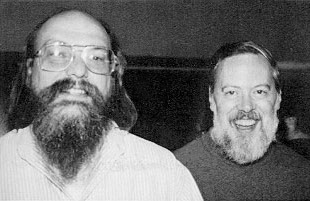
*Ken Thompson and Dennis Ritchie in 1973*
&&/font
&&cont
[Ken Thompson](TODO), one of the programmers that worked on it, still had some desire to work on operating systems.
After Bell Labs left Multics, he made a program for maximizing the throughput of a disk on a PDP-7.
To test it, he wrote some programs over time and eventually realised an operating system could easily be made.
This marked the birth of UNIX, an operating system, based and expanded on many of Multic's ideas (except the "grow too large" one).
&&/cont
&&/table
&&/slide &&/font
&&font30 &&slide
# 2. Structure of UNIX-likes
Ignoring [standards](https://unix.stackexchange.com/questions/14368/difference-between-posix-single-unix-specification-and-open-group-base-specifi/14415) and [specifications](https://unix.stackexchange.com/questions/87686/what-makes-an-operating-system-unix-like), in my opinion, from the point of a user, a UNIX-like OS has the following components:
&&lineb1
1. **shell**: A programmable replaceable command-line interpreter, with utilities for managing the whole system and support for pipelines and I/O redirection
2. **UNIX-style file system**: [Filesystem](https://en.wikipedia.org/wiki/Unix_filesystem) as a rooted tree (even for all seperate volumes), objects (nodes) in the file system are [inodes](TODO) and an inode can be [(at least)](https://en.wikipedia.org/wiki/Unix_file_types) either a regular file, directory or devices. Permissions are set per owner, group members and other users.
3. **kernel**: Program that manages all communication and operations between the hardware and software
&&lineb3
&&font20 *For now we'll generally just look over some of the common stuff and go into detail later, while in Linux.* &&/font
&&/slide &&/font
&&font35 &&slide
## 2.1. shell
&&lineb2 &&ftable
&&cont
Our operating system is divided into layers, [like an onion](https://youtu.be/-FtCTW2rVFM?t=57).
Only the kernel has access to the hardware.
shells and executables (binaries) have access to the kernel.
shells provide user interfaces, [both](http://en.wikipedia.org/wiki/Shell_%28computing%29) command-line and graphical.
While on the topic of UNIX, we'll only discuss the former.
&&/cont
&¢ered  &&/centered
&&/table &&/slide &&/font
&&font27 &&slide
Command-line shells operate solely with text, preferrably without too fancy formatting (there are very modern ones that can handle images, but these are an exception, rather than the norm).
&&lineb1 &&ftable
Historically, video displays (at first [CRT](TODO) ones) became widely available in the late 1970s, but before that the "mainstream" way to access a computer was with a teleprinter (commonly known as teletype): effectively a (typewriter) keyboard and a fast text priner, connected to a computer.
&&font18 &&fright

*Teletype Model 33 by [Arnold Reinhold](https://commons.wikimedia.org/wiki/User:ArnoldReinhold)*
&&/fright &&/font
&&tarow
&&font18

*DEC VT100 by [Jason Scott](https://www.flickr.com/people/54568729@N00)*
&&/font
Later, those were replaced by terminals, a "normal" keyboard and a display, connected to a computer.
**The** most popular and influential one was the [VT100](TODO), with it's most influential feature being neven seen before support of [ANSI escape codes](https://en.wikipedia.org/wiki/ANSI_escape_code): special text that would modify the cursor position and later being able to, for example, change colors for specific text.
&&/table &&/slide &&/font
&&font27 &&slide
In UNIX CLI shells, most of the commands are just regular programs.
These programs could exist in more than one folder: `/bin` and `/usr/bin` for example, so we store every location in a variable called "PATH".
Command-line UNIX shells always have the following features:
- pipelines: being able to redirect the output from one command to another without limit
```
command1 [args...] | command 2 [args...] | ...
```
- I/O redirection: redirection of input and output, allowing use to use a file as (user) input:
```
command [args...] < filepath
```
or to put output into a file
```
command [args...] > filepath
```
&&font18
*A lot of modern ones also support [heredocs](https://en.wikipedia.org/wiki/Here_document), [job control](https://en.wikipedia.org/wiki/Job_control_%28Unix%29), built-in [test command](https://en.wikipedia.org/wiki/Test_%28Unix%29) and more, we'll explore them later.*
&&/font
&&/slide &&/font
&&font30 &&slide
## 2.2. UNIX-style file system
- Rooted singular tree of directories. Disk partitions, removeable media, etc. all live in that tree.
- Each tree object (node) is an [i(ndex)node](TODO), containing type, ownership, access, internal data and any other metadata, but **not** name!
- Directory inodes (files) contain a table with rows of names and inode numbers, mapping a file name to it's contents. Each row is called a [hard link](https://en.wikipedia.org/wiki/Hard_link). Every directory has a hard link to itself, called ".", and a hard link to it's parent, called "..".

&&/slide &&/font
&&font30 &&slide
The main attributes that every inode has are as follows:
- [file type](https://en.wikipedia.org/wiki/Unix_file_types): Each inode represents some sort of file (data), but a "file" can also be a directory or device, so we need to know how to handle it.
There are 7 main types (but there can exist more, depending on OS):
+ **regular**: just a plain old file
+ **directory**: as explained, a file containing hard links to other files. Each directory is allowed to appear only once in a single parent.
+ **symbolic link**: points to any file (or directory). It contains the (relative) path to that object (as a simple string), so a symlink could even not be valid.
+ **FIFO special**: aka [named pipe](https://en.wikipedia.org/wiki/Named_pipe), a special type of regular file, where at any moment only one process can read from it and one can write to it. It takes the concept of shell pipes to inter-process communication.
+ **block special**: a device which is randomlly accessible, like a hard drive or cdrom drive.
+ **character special**: devices which are accessed via serial streams of input or output, like keyboards, mice, graphics cards and teletypes
+ **sockets**: file for inter-process communication. Compared to FIFO specials, they can be used by more than two processes, used in both direction and support [file descriptors](https://en.wikipedia.org/wiki/File_descriptor) and packets
&&/slide &&/font
&&font30 &&slide
- [file permissions](https://en.wikipedia.org/wiki/File_system_permissions): control the ability of a user to read (navigate for directories), change and execute a file.
A user in UNIX is essentially a small collectino of data, most important of it being an ID (number), a name (string), a group id (number; files created by the user are in that group) and a password.
Groups are also small collections of data, but much simpler, comprised only of an ID (number), a name (string) and a list of users that are "in" the group. Their main purpose is to simplify access control.
The data for each is stored in `/etc/passwd` and `/etc/group` respectively.
File permissions are split into three sets: what the owner can do, what group members can do and what anyone else can do.
Each set contains a mix of three permissions: **r**ead, **w**rite and e**x**ecute, and each set stores some combination of them.
- link count: the amount of hard links that point to the inode. Every directory inode contains (normally) exactly two: one from the parent and one from itself ("."). A file is only deleted where there are no hard links left to it (or when there is only one for a directory).
- User ID of owner and Group ID
- file size and timestamps for modification
&&/slide &&/font
&&font35 &&slide
## 2.3. Kernel
&&lineb2
The kernel is completely separated from everything else, it only communicates with hardware and exposes an API to have other programmes communicate with it.
&&lineb2
Linux is **not** an operating system, it is a kernel!!!
&&/slide &&/font
&&slide
## Sources
- [wikipedia.org](https://en.wikipedia.org/) has been used extensively.
- [CS416 - Operating Systems Design](https://people.cs.rutgers.edu/~pxk/416/index.html) by [Paul Krzyzanowski](https://people.cs.rutgers.edu/~pxk/rutgers/) at [Rutgers State University](https://www.cs.rutgers.edu/)
- [Origins and History of UNIX, 1969-1995](https://web.archive.org/web/20220713165958/https://homepage.cs.uri.edu/~thenry/resources/unix_art/ch02s01.html) from [The Art of Unix Programming](TODO) by Eric Steven Raymond
- [Ken Thompson interviewed by Brian Kernighan at VCF East 2019](https://www.youtube.com/watch?v=EY6q5dv_B-o) by [Vintage Computer Federation](https://vcfed.org/)
- [Hard links and Unix file system nodes](https://teaching.idallen.com/dat2330/04f/notes/links_and_inodes.html) from [DAT 2330 Introduction to Operating Systems](https://teaching.idallen.com/dat2330/04f/) by [Ian D. Allen](http://www.idallen.com/)
&&/slide